Review tool + deliveries

Video review and delivery, built for filmmakers.

Send cuts to clients for frame-accurate comments. Deliver master files with download links. One subscription, one login — no per-GB transfer fees, no separate review tool, no awkward Dropbox permission requests.

Sign up to start the 3-day trial.Limited usage during the trial — 1 project, 1 hour of footage, 5 GB storage, 10 GB transfer. Full plan unlocks when it converts. Card required; cancel anytime in the first 3 days to avoid the charge.
Sign up →

Built for the working freelancer

One tool instead of four

Most of us are juggling a review tool, a transfer service, a folder share, and a cloud backup. Four logins, four bills, four awkward moments when a client asks where they’re supposed to download something.

Review your cuts with clients, send footage to color and sound, upload master files, send them to your client — same login, predictable monthly cost. Recipients download without signing up for anything.

Get clients on the same page

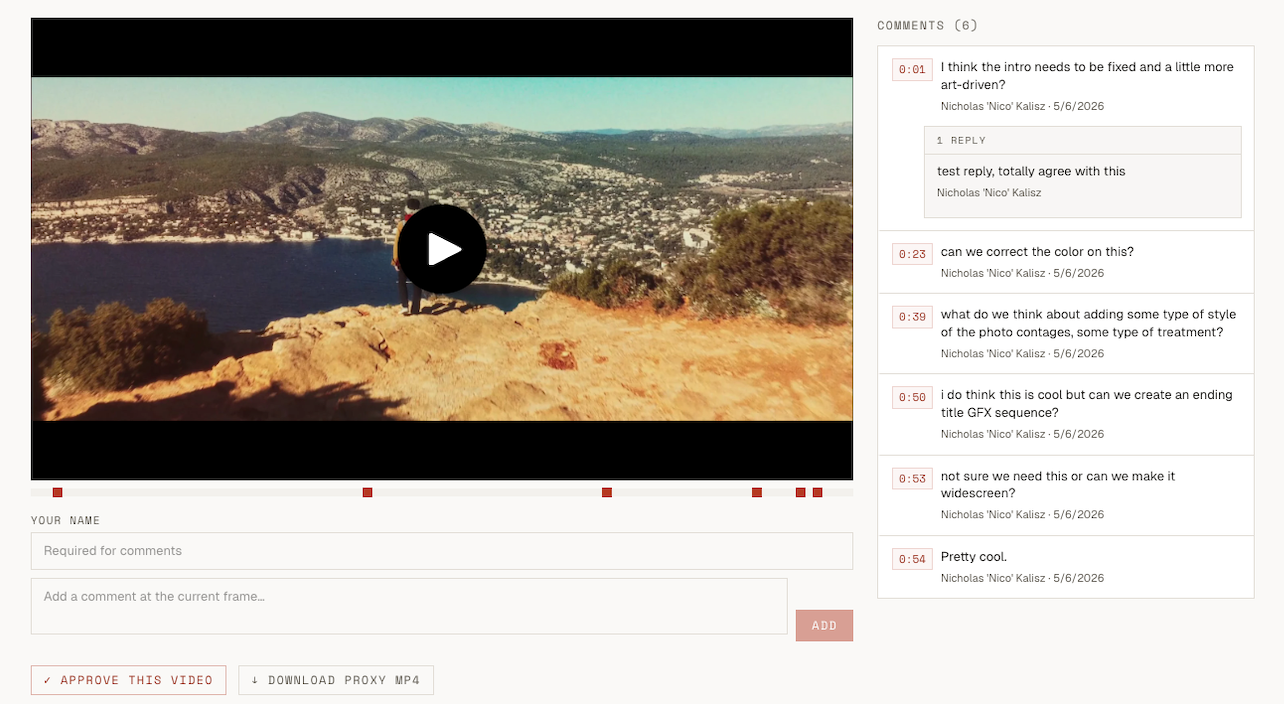
Inside · review

Get clients on the same page

Frame-accurate comments and per-asset approval, no client account needed.
Hand off finals and dailies, cleanly

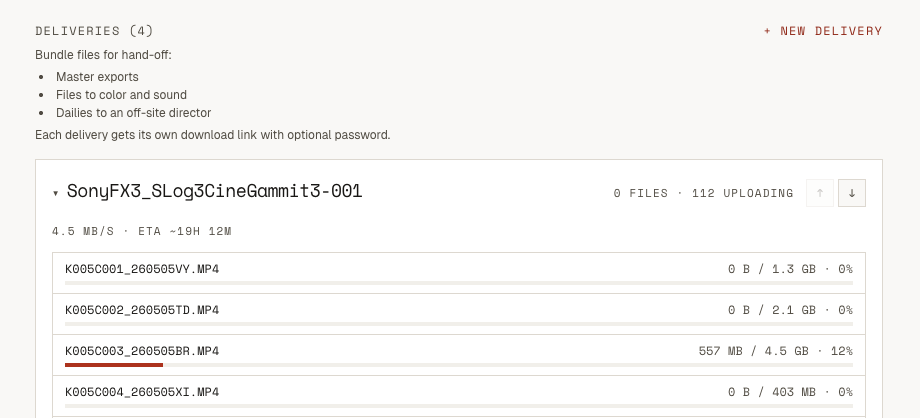
Inside · deliveries

Hand off finals and dailies, cleanly

Network drops recovered automatically. Live speed and ETA. Password-protected download links.
Big files, on autopilot

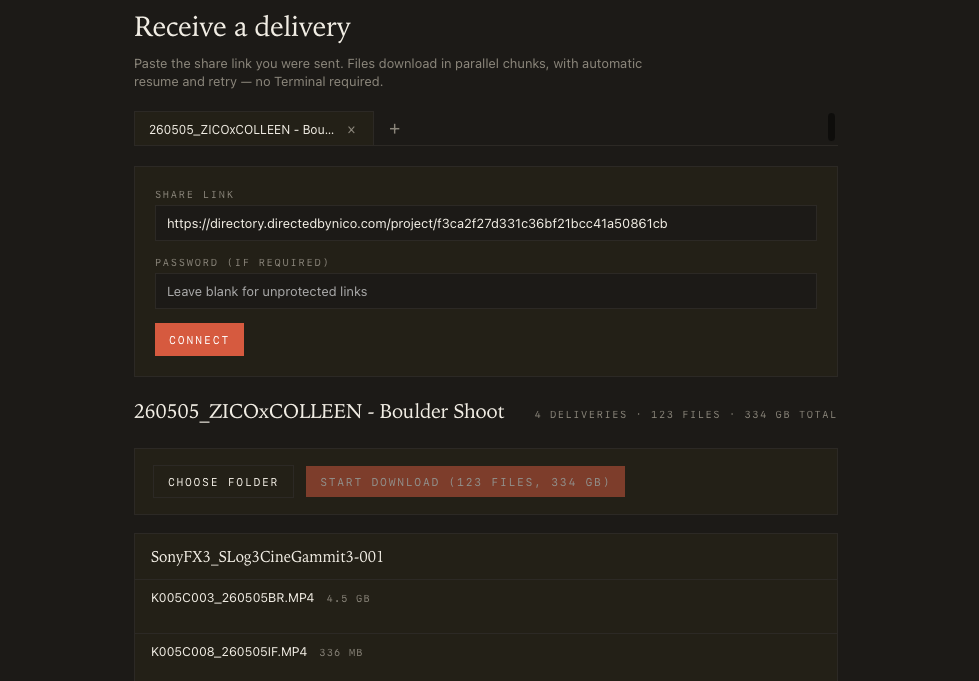
Inside · desktop app

Big files, on autopilot

Mountain Creative Delivery — native Mac app for recipients. Paste the share link, pick a folder, walk away. Parallel-chunk downloads, automatic resume on dropped Wi-Fi, no Terminal. Free for anyone you send files to.

↓ Get the Mac app

Have you had this moment?

“Hey, can you get me access to that Dropbox folder?”

The moment a client asks this, you’ve already lost the workflow. They wanted to download a file. They got a permission request.

What you get vs. the usual stack

Dropbox / DriveMASVFrame.ioHere
Built for filmmakersNoYesYesYes
Client review built inNoNoYesYes
Recipient downloads, no accountNoYesNoYes
Folder structure preservedYesYesn/aYes
Pricing modelFlat monthly$0.25/GB$25/seat/moFlat monthly
Storage at top tier3 TB ($20/mo)Pay-per-use250 GB ($25/seat)1 TB ($35/mo)
Recipient downloads count against your billYes (egress capped)Yes (per GB delivered)Yes (limits per tier)No (unlimited)
1 TB delivery to a client$20/mo + permission hassle~$250 one-offNeeds Team plan ($75+/seat)$35/mo, all in
Network drops recovered automaticallyPatchy past 5 GBYesYesYes
Recipient sees folder hierarchyAfter they sign inFlat listn/aYes

Honest call-out: MASV’s transfer protocol is faster than ours on giant files. We’re not trying to beat them on raw speed. We’re trying to beat them on the bill at the end of the month.

Pricing

Flat monthly. No per-GB transfer fees.

One bill. Recipient downloads are unlimited on every paid plan and never count against your storage. 3-day trial on any tier.

Solo

$9/mo

One filmmaker, working independently

  • 1 project at a time
  • 200 GB project storage
  • Unlimited recipient downloads
  • Frame-accurate client review
Most picked

Studio

$19/mo

The everyday tier for working freelancers

  • 10 projects
  • 500 GB project storage
  • Unlimited recipient downloads
  • Password-protected delivery links

Pro

$35/mo

Larger jobs, larger masters

  • Unlimited projects
  • 1 TB project storage
  • 100 GB per file
  • Priority encoding queue

Questions people actually ask

Frequently asked

Do my clients need an account to review or download?
No. Clients open a share link in their browser — they comment on cuts, approve, and download masters without signing up for anything. The account is yours, not theirs.
How is this different from Frame.io?
Frame.io charges per seat ($25/seat/month for Team) and gates large deliveries behind higher tiers. Here, pricing is one flat monthly bill and recipient downloads don't count against your storage or transfer. You also get true master-file delivery in the same tool, not a separate transfer service.
How is this different from MASV or WeTransfer?
MASV bills per gigabyte delivered (around $0.25/GB), so a 1 TB hand-off can cost $250 or more. Here, recipient downloads are unlimited on every paid plan and don't add to your bill. You also get a real review tool with timecoded comments and approvals in the same subscription.
What happens to my files if I cancel?
Your projects, comments, and approvals stay in your account in read-only mode for 30 days after cancellation so you can re-subscribe without losing anything. After 30 days the files are permanently deleted. Active share links stop working as soon as the subscription ends.
How large can my master files be?
Per-file caps depend on plan — up to 100 GB per file on Pro. Total project storage is 200 GB on Solo, 500 GB on Studio, and 1 TB on Pro. Network drops during upload are recovered automatically on the desktop app and in the browser.
Is there a free trial?
Yes — a 3-day trial. Limited usage during the trial (1 project, 1 hour of footage, 5 GB storage, 10 GB transfer). A card is required to start, and you can cancel any time in the first 3 days to avoid the charge.
What does the Mac desktop app do?
Mountain Creative Delivery is a free native Mac app for the people you send files to. Paste a share link, pick a folder, and it downloads in parallel chunks with automatic resume on dropped Wi-Fi — no Terminal, no install instructions. The app is free to use even if the recipient never opens an account.
Can I use this for client review only, without deliveries?
Yes. The review tool and the delivery tool live in the same app on the same subscription — use one, the other, or both. Most filmmakers end up using both because the project, the cuts, and the master files all live in one place.