chimping.io
CHIMPINGio APP for VIDEO REVIEW x UPLOAD x RECEIVE x PROJECT SYNC
Free native Mac app built for the kind of deliveries browsers choke on. Paste the share link, pick a folder, walk away. Files pull in parallel chunks; dropped Wi-Fi recovers automatically; folder structure lands on disk exactly the way the sender uploaded it. Or keep the link synced: new files download on their own as the sender adds them. No aria2 install, no command-line configuration, no fiddling.
Apple Silicon · macOS 11+ · ~30 MB
Moving over from Frame.io? There’s a separate one-time migration app: chimping.io/migrate
What this app does
- ·Downloads a delivery in parallel: multiple files, multiple chunks per file. Saturates your connection.
- ·Resumes from where it left off when the WiFi flakes, you close the lid, or the cable trips. Partial files aren't lost.
- ·Pause and cancel buttons. Live MB/s readout and an ETA so you know whether to wait or come back tomorrow.
- ·Works with password-protected share links and project bundles (multiple deliveries inside one link).
- ·Keeps a share link synced to a folder. Paste the link once, pick a folder, and the app checks every few minutes. Anything new the sender adds downloads automatically, structure intact. It only ever adds files; nothing on your drive is touched or deleted.
- ·Uploads and team sync (with a chimping.io account). Send folders or individual files straight to your projects, keep a card offload or renders folder uploading continuously, or share one two-way Project Sync folder: files anyone on the team adds appear on every machine within minutes.
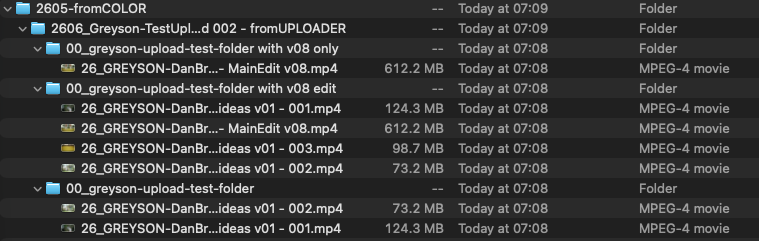
- ·Folder structure preserved on disk. Whatever folder hierarchy the sender uploaded lands on your Mac exactly the same: /footage, /audio, /graded/Reel-01, multi-level project folders. No zip step, no flattening, no re-organizing after the fact. Critical for color round-trips, dailies, and any project hand-off where the folder shape is the metadata.
Installing
- 01Open the downloaded
.dmgand drag chimping.io into your Applications folder. - 02Double-click it. That's the whole install. The app is signed with an Apple Developer ID and notarized by Apple, so macOS opens it without warnings. Updates arrive automatically: the app checks on launch and asks before installing.
System requirements
- ·macOS 11 (Big Sur) or later on Apple Silicon (M1, M2, M3, M4). Intel Mac and Windows builds are in progress.
- ·~30 MB disk space for the app itself; deliveries land wherever you point the folder picker.
Trouble?
Email nicholas@directedbynico.com and we'll get you sorted. Include a screenshot if the app errored out. There's usually enough in the message to point at the cause.
Free project folder structure
The numbered folder system fifteen years of productions have run on: camera originals through masters, with the naming conventions built into the folder and file names. The Mac app creates it date-stamped in one click (and can sync it to the whole team); or download the empty structure here and use it anywhere.
Download the folder template (.zip)Frequently asked
- Is the chimping.io app free?
- Yes. The desktop app is free for anyone. No account, no subscription, no email required. The sender pays for hosting; recipients just download.
- Does it work on Intel Mac or Windows?
- Not yet. The current build is Apple Silicon only (M1, M2, M3, M4) on macOS 11 or later. Intel Mac and Windows builds are in progress behind code signing.
- Will macOS warn me on first launch?
- No. The app is signed with an Apple Developer ID and notarized by Apple, so it opens like any other Mac app: drag it to Applications, double-click, done. No Gatekeeper warnings, no right-click-to-open tricks, no Privacy & Security detour.
- What does it actually do differently from a browser download?
- Five things. (1) It downloads files in parallel chunks instead of one at a time, which saturates your connection and is dramatically faster on multi-GB files. (2) It resumes automatically if the Wi-Fi drops, you close the lid, or the cable trips. Partial files aren't lost. (3) Folder structure is preserved on disk exactly the way the sender uploaded it: no zip step, no flattening. (4) It works through password-protected share links and bundles of multiple deliveries in a single link. (5) It can keep a share link synced to a local folder: the app checks the link every few minutes and downloads anything new automatically, so an editor's drive fills in as the sender adds files.
- Can it keep a shared folder in sync automatically?
- Yes, three ways. Recipients can sync a share link to a local folder: new files the sender adds download automatically, folder structure intact, no account needed. Senders with a chimping.io account can point the app at a local folder (a camera card offload, a renders folder) and have it upload continuously. And a whole team can share one Project Sync folder: everyone points the app at the same link, and files anyone adds flow to every machine within minutes. Local edits always win over cloud copies, and deletes are deliberate: only the folder's owner can remove files (they land in a 30-day trash on the site), and teammates get a clean-up prompt before anything on their own disk is touched.
- Does the Mac app preserve folder structure on download?
- Yes. Whatever folder hierarchy the sender uploaded lands on your Mac exactly the same: /footage, /audio, /graded/Reel-01, multi-level project folders. The browser flattens nested folders into a single download list; the app respects the original structure. This is the main reason colorists, editors, and finishing artists use the app instead of the browser download. They need /graded and /audio to come back as folders, not as one flat dump in Downloads.
- Do I need a chimping.io account to use it?
- Not to receive. Downloading and keeping a share link synced both work with just the link the sender gave you: no account, no email. An account is only needed for the sending side: the Upload + Sync mode (watch a local folder, upload continuously) connects to your chimping.io account with a device key.
- Is it safe to download?
- Yes. The app is signed with an Apple Developer ID and notarized by Apple, which means Apple's automated review has scanned every build before it reaches you. It's open about what it does and where it downloads from (only the share link you paste in). It doesn't track you, doesn't phone home with telemetry, doesn't auto-update without your input.
- Can it replace aria2, JDownloader, or rclone?
- For chimping.io share links, yes. It does parallel chunked downloads with auto-resume, the same things you'd configure aria2 to do, without an aria2 install or command-line setup. For other URLs, no. It's purpose-built for this platform's links, not a general-purpose download manager.